Overview
Photographers capture thousands of photos across different occasions within a single event — the Mehendi, the Sangeet, the Wedding ceremony, the Reception. Manually sorting and categorizing these into separate folders takes hours. GetUrSnap's smart categorization does this automatically, using the EXIF timestamp from each photo to sort them into the right sub-event.
The Problem
After a wedding, a photographer might have 5,000+ photos spanning 8–10 different occasions across 2–3 days. Going through each photo to sort it into the right category — ceremony vs. reception vs. portraits — is mind-numbing work. Both photographers and clients struggle to navigate a flat gallery of thousands of unsorted photos, scrolling back and forth trying to identify which photos belong to which occasion.
The Solution
GetUrSnap uses smart time-based categorization. After uploading your photos, you create sub-events and define a time range for each (e.g., "Ceremony: 10 AM–12 PM, Reception: 6 PM–11 PM"). The system reads the EXIF timestamps from your photos and automatically sorts them into the correct sub-event. Thousands of photos get categorized in seconds, not hours. You can preview the sorting before applying, and manually adjust any photos that land in the wrong bucket. Your clients can then browse by occasion — viewing just the ceremony photos, or just the reception, instead of scrolling through the entire collection.
Key Benefits
Automatic time-based sorting
Photos are categorized based on capture timestamps, matching them to your defined sub-event time ranges.
Pre-built event templates
Templates for common event types like weddings, engagements, and receptions pre-fill sub-event names and time ranges.
Hours saved per event
What takes 2–4 hours manually is done in seconds. More time for shooting, less time for sorting.
Better client experience
Clients can browse by occasion instead of scrolling through thousands of unsorted photos.
How to Use
Follow these steps to get started with Smart Photo Categorization in your GetUrSnap dashboard.
Upload all event photos
Upload all your photos from the event into a single event. Don't worry about sorting them first.
Create sub-events
Create sub-events for each occasion (e.g., "Haldi," "Wedding," "Reception"). Give each a descriptive name, or use a pre-built template.
Define time ranges
Set the start and end time for each sub-event. This tells the system which photos belong where.
Preview and auto-categorize
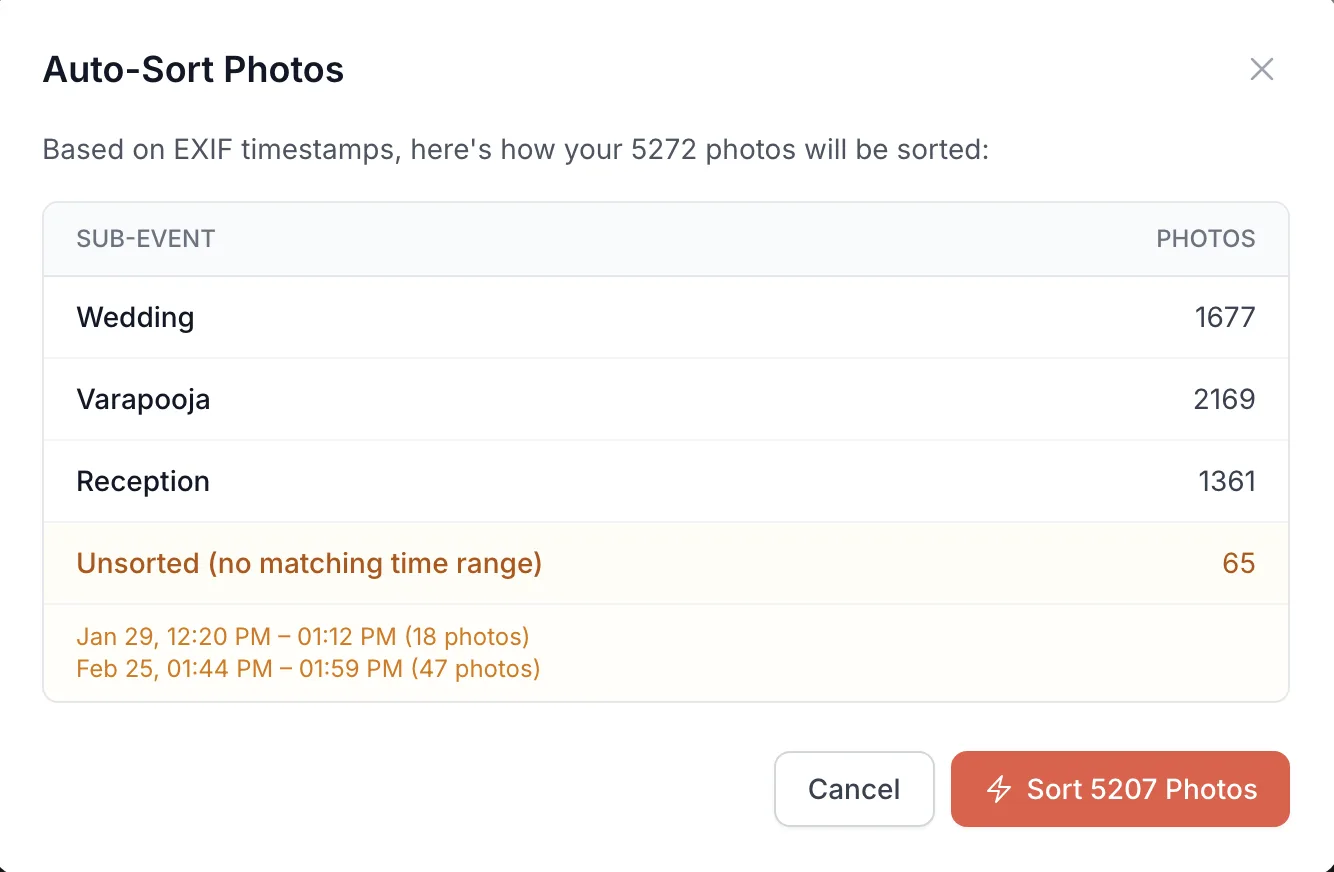
Click "Categorize" to preview how photos will be sorted. The system reads EXIF timestamps and shows you the assignment before applying.
Review and adjust
Review the categorization. You can manually move any photos that were miscategorized (e.g., if camera timestamps were off).
Deep Dive
How EXIF-based categorization works
Every digital photo contains EXIF metadata — including the exact date and time it was captured. GetUrSnap reads this metadata and compares it against the time ranges you define for each sub-event. A photo taken at 11:15 AM during a ceremony that runs from 10 AM to 12 PM gets automatically placed in the "Ceremony" sub-event. This process handles thousands of photos in seconds and works with any camera that records timestamps.
Preview before you commit
Unlike blind auto-sort tools, GetUrSnap shows you a full preview before applying any changes. You see exactly how many photos will land in each sub-event, which photos have no EXIF data, and which fall outside any defined time range. This lets you adjust time ranges or create additional sub-events before committing — ensuring clean, accurate categorization every time.
Pro Tips
Sync your camera's clock before each event. Accurate timestamps are the key to perfect auto-categorization.
If using multiple cameras, ensure all camera clocks are synchronized. Even a 5-minute difference can miscategorize photos.
Create sub-events for key moments like "First Dance" or "Ring Ceremony" — clients love being able to jump directly to these.