Overview
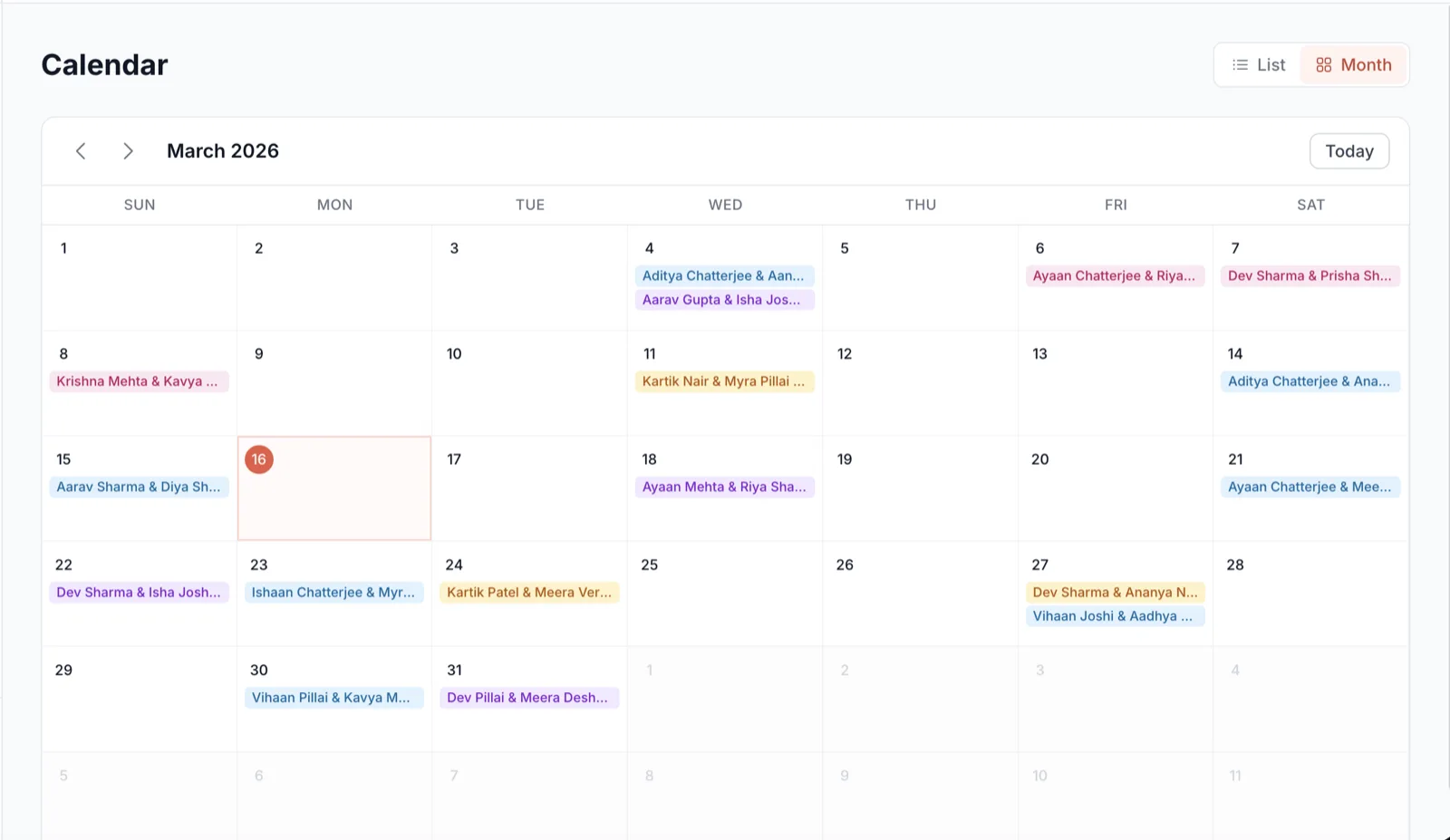
Running a photography business means juggling multiple events, deadlines, and commitments. The event calendar brings everything you need to manage your schedule under one roof. See your upcoming, past, and future events in a clean, intuitive calendar view. As soon as you create an event, it appears on your calendar — allowing you to track and manage event times and schedules effortlessly.
The Problem
Most photographers manage their schedules across multiple apps — Google Calendar for shoots, a notebook for deadlines, WhatsApp for client follow-ups. This fragmented approach leads to double-bookings, missed deadlines, and the constant anxiety of not knowing what's coming next. Without a central view, it's impossible to assess your capacity and plan ahead.
The Solution
GetUrSnap's event calendar is directly integrated with your event management. Every event you create automatically appears on your calendar with its date, time, and venue. You can see your entire month at a glance — which days are booked, which are free, and which have deadlines approaching. It's the single source of truth for your photography business schedule.
Key Benefits
Automatic event sync
Events appear on your calendar the moment you create them. No manual entry, no forgetting to add things.
Visual schedule overview
See your entire month in one view. Booked days, free days, and upcoming deadlines — all at a glance.
Never double-book
Instantly see if a date is already taken before confirming a new event. Prevent scheduling conflicts before they happen.
Plan with confidence
Know your workload weeks in advance. Plan prep time, editing time, and personal time around your events.
How to Use
Follow these steps to get started with Event Calendar in your GetUrSnap dashboard.
Open the calendar
Navigate to the Calendar section from your dashboard sidebar. Your calendar loads with all existing events already plotted.
View your schedule
Browse by month to see your bookings. Events are color-coded and show the event name, date, and status.
Check availability
Before confirming a new event with a client, check the calendar to ensure the date is free.
Click for details
Click any event on the calendar to see full details — client name, venue, event type, and status.
Plan your workflow
Use the calendar to plan editing days, delivery deadlines, and breaks between events.
Deep Dive
Why a dedicated calendar beats Google Calendar
Google Calendar is a general-purpose tool — it works for meetings, reminders, and personal events. But it has no concept of photography events, storage deadlines, delivery timelines, or event status. GetUrSnap's calendar is built specifically for photographers: each event on the calendar is linked to its gallery, its storage, its delivery status, and its payment status. One click takes you from "what's happening on March 15" to the full event dashboard.
Pro Tips
Block out editing days on your calendar right after each shoot. This ensures you don't over-commit.
Check your calendar every Sunday evening to plan the week ahead. It takes 2 minutes and prevents surprises.
Use the calendar view when negotiating dates with new clients. Nothing looks more professional than knowing your availability instantly.